

Sports
Connect gym or fitness studio with locks to ForgeNEX
Try ForgeNEX with this solution for 14 daysChoose this solution when you set up your CRM.
What you can manage
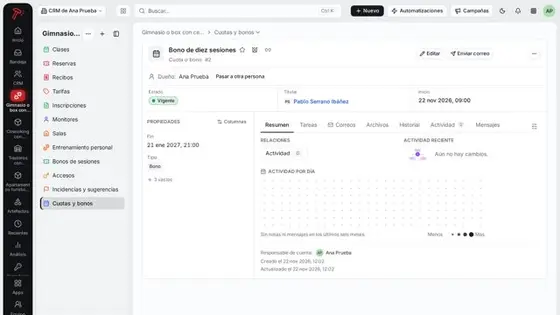
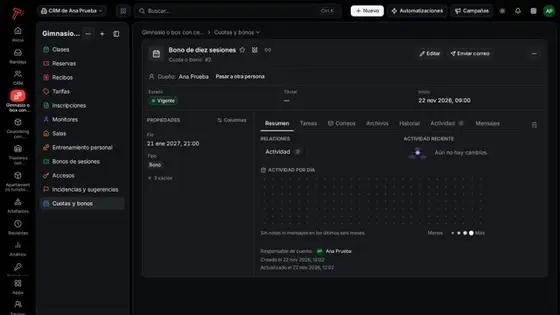
Use «Memberships and passes» as the starting point for Gym or fitness studio with locks. The same workspace also has tables for «Members», «Classes», and «Bookings», so your team can keep each type of record in its own place.
What’s included
Memberships and passes
Name · Member · Starts · Ends · Status (Active and Cancelled) · Access code · Code validity · TTLock lock · Type (Membership and Pass).
Views · calendar
Members
Member no. · Name · Phone · Email · Tax ID · Start date · Fee (Monthly, Quarterly, Annual, Mornings only, and 10-session pass) · Status (Active and Inactive) · Ended on · Accepts marketing communications · Bookings · Active enrollments · Pending payment · Accesses.
Views · Kanban board
Record PDF.
Classes
Activity · Type (Indoor cycling, Strength, Cardio, Yoga and Pilates, Dance, and Combat sports) · Instructor · Room (Room 1, Room 2, Cycling studio, and Outdoor) · Date and time · Duration (min) · Capacity · Reserved places · Description · Room · Instructor (profile) · Occupied places · Available places · Class ends.
Views · calendar and Kanban board
Bookings
Member · Member phone · Class · Activity · Date and time · Status (Reserved, Attended, No-show, and Cancelled) · Starts · Minutes.
Views · Kanban board
Receipts
Number · Member · Member tax ID · Period · Issued on · Line items (Description, Quantity, Price, and Total) · Amount · Paid · Payment method (Direct debit, Card, Cash, and Bizum) · Paid on · Enrollment · Returned · Member.
Views · calendar
Record PDF.
Rates
Name · Price · Payment terms (Every month, Every quarter, and Every year) · Schedule · What's included · Active · Enrolled students.
Enrollments
Number · Member · Member · Member tax ID · Rate · Rate · Schedule · Fee · Payment terms (Every month, Every quarter, and Every year) · Start date · Next instalment · Cancellation date · Status (To be signed, Active, Paused (overdue payment), and Cancelled) · Signed contract · Receipts.
Views · Kanban board
Record PDF.
Instructors
Name · Phone · Email · Specialty · Per class · Per workout · Classes · Completed workouts · Next in rotation.
Views · schedule
Rooms
Name · Maximum capacity · Equipment · Shelly lighting or climate control.
Views · schedule
Personal training
Member · Member · Instructor · Session pass · Sessions remaining · When · Minutes · Session goal · Status (Reserved, Done, and Cancelled).
Views · Kanban board
Session passes
Member · Member · Sessions · Price · Purchased on · Expires · Used · Remaining.
Accesses
Member · Member · When · Type (Available room, Class, Training, and With a guest).
Issues and suggestions
Member · Type (Machine breakdown, Cleaning, Suggestion, and Complaint) · Details · Date · Status (Open, In progress, and Resolved).
Views · Kanban board
Automation rules supplied · 17
Message templates · 2
A day with ForgeNEX
- When you add memberships and passes, you start with name, member, and starts so the team has the details to hand.
- As the day goes on, you use the calendar to keep track of memberships and passes.
- Once TTLock is connected, the automation generates an access code for the person who’s due to arrive. The rules can replace or revoke the code if the booking or access arrangement changes.
Working with Pix
- Whose gym access pass expires this week?
- Which gym memberships have been cancelled and still show an access code?
Pix can access only the records your account can see.
Connectors
- TTLock · Access codes for compatible locks.
- Shelly · Control of compatible devices, such as lighting. Optional.
Frequently asked questions
- Where do I start with «Memberships and passes»?
- Choose «Gym or fitness studio with locks» when setting up ForgeNEX CRM. Open «Memberships and passes» to create and review records with the included fields.
- Can I adapt the solution to the way my team works?
- Yes. After installing «Gym or fitness studio with locks», use the CRM designer to adjust fields and views such as those in «Memberships and passes».
- Which connectors are included for «Gym or fitness studio with locks»?
- The solution is configured to work with TTLock and Shelly. Connect your account and check compatible devices before using these workflows.
Let us or a partner set it up for you
Tell us how your team works so we can discuss the setup.
Talk about setup