

How to organise sales opportunities in a CRM
Set up a sales pipeline in ForgeNEX CRM, decide when deals should move forward and use loss reasons to review your sales process.
An opportunity is a particular sale that still requires a decision. One company might have several opportunities at the same time: a maintenance contract up for renewal this month and an installation they will decide on over the summer. Putting both in the same contact note leaves the next person opening the CRM unsure how much the business expects to earn or when to call back. In ForgeNEX CRM, Opportunities gives each deal a separate record and lets you see which ones need attention on the board.
Decide what needs to happen before a deal moves forward
Write down an observable condition for each stage you use. For a small team, a reasonable sequence might be enquiry, needs confirmed, proposal sent and decision pending. An enquiry moves to needs confirmed when you understand what the other party wants to purchase. A proposal counts as sent when the decision maker has it. A pending decision needs an agreed follow-up point, even if the purchase date can still change.
These names are an example you can use to agree on a process with your team. Look at the stages already in your workspace before putting the example into practice. If two colleagues interpret the second-to-last column differently, look at three deals together. An extra column earns its place when it changes what someone has to do. Separating proposals being drafted from proposals already sent may prevent confusion. Splitting proposals by type may simply give people two places to check.
Record a deal another person can pick up
Open Opportunities and create a record for the deal you want to track. Use a title that identifies the work, such as “Annual office maintenance”, and check which person or company it belongs to. If you assign someone to it, make sure they know what needs resolving. Enter a value once you have a basis for estimating it, and check that the expected close date still reflects the decision timeline, especially if it came from the first call.
Agree how you will record the next step. A note such as “send the breakdown for both sites before Thursday’s meeting” gives a colleague more to work with than “customer interested”. Include enough context for someone to pick up the deal. If the proposal needs approval from procurement, make clear who will contact them and when. Keep a separate task when you need to assign that work or manage it alongside other team commitments.
Before duplicating a record, consider whether the change is a separate purchase or a revision of the same proposal. A scope revision in the same negotiation usually belongs on the current opportunity. Two decisions that can conclude independently are worth tracking separately. You can then review the value of each decision without counting an amount twice because a document was sent again.
Use two different ways to review the board
In Opportunities, open the sort menu and choose the option that orders by amount, highest first. The most valuable opportunities appear at the top of their respective stages. This is handy before dividing up the week’s follow-ups. If you are preparing today’s calls, switch to expected close date to put nearer dates first. Sorting changes the order within a stage and leaves the cards in their columns. Switch back to manual dragging when you want to set the priority yourself within a stage.
One way to start a review is to look at opportunities with an approaching date and an outstanding action. The team can decide who will call, what document needs sending and whether the expected date is realistic. Then look at the opportunities with the greatest value and check the assumptions. A large deal with an unconfirmed scope can absorb attention that other customers need. The board gives people an order to work through, and the discussion helps them choose where to spend time today.
Keep expected close dates meaningful. When one has passed, update the estimate using what you know or decide whether the opportunity should close. If overdue cards sit together for months, the date-based review stops helping you distinguish the deals that actually need attention this week.
Choose loss reasons you can act on
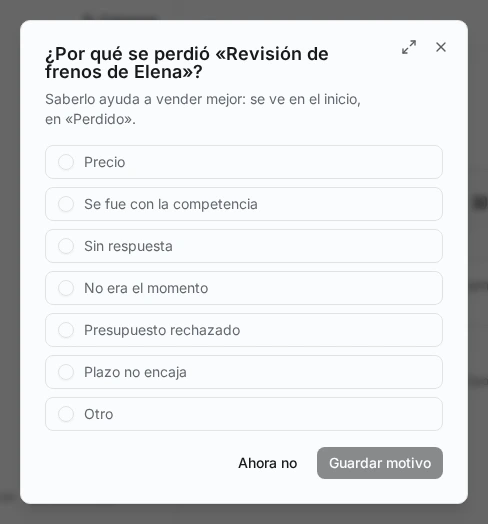
In settings, find Loss reasons and add categories the team can distinguish based on what happened. “Timing did not work” may prompt you to check your response time or availability. “Outside our scope” can help you identify requests for services you do not offer. “Project postponed” describes a different decision from “Chose another proposal”. Start with a short list of reasons that two people would apply in the same way to the same conversation.
When you move an opportunity to Lost, select the reason and save it. Use Other with a brief explanation if none of the reasons fits. If a customer explained that their building permit will only come through next year, record that detail. It will be more helpful at the next review than an assumption that they chose a cheaper supplier. A short note also gives you evidence to decide whether a recurring case deserves a category of its own.
In the money section on Home, review the lost value alongside the summary of reasons. Read a few of the underlying opportunities before deciding what to change. One large proposal can dominate the total, while a reason that appears repeatedly on smaller deals may point to a different operational problem. Consider both the number of opportunities that closed and the value they represented.
Run your first review with deals the team knows
Choose five open opportunities and two closed ones that your colleagues can explain. Check whether each record has someone who can state the next action and whether two colleagues would put it in the same stage. Sort by date, review the upcoming decisions and then sort by value. For the lost deals, check that the saved reason matches what happened. End the session by making one small decision, such as renaming an ambiguous reason or clarifying when a sent proposal moves to decision pending. At the next review, see whether that decision made the pipeline easier to understand.