

Accommodation
Connect rural accommodation and hostel to ForgeNEX
Try ForgeNEX with this solution for 14 daysChoose this solution when you set up your CRM.
What you can manage
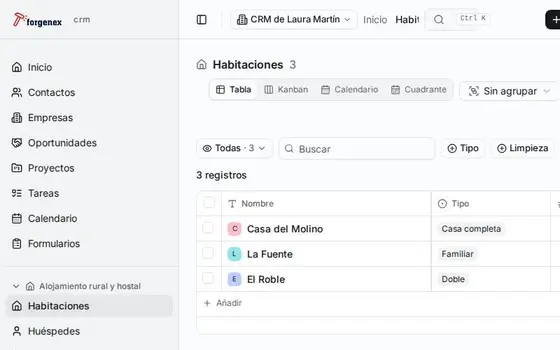
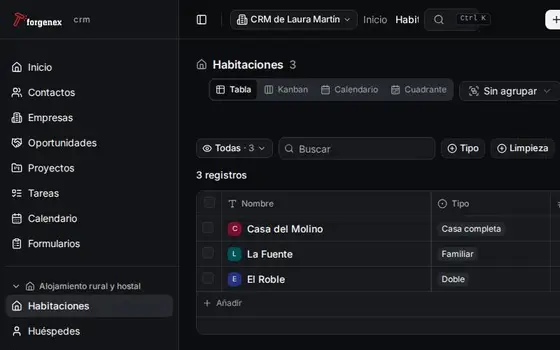
Use «Rooms» as the starting point for Rural accommodation and hostel. The same workspace also has tables for «Guests», «Bookings», and «Rates and seasons», so your team can keep each type of record in its own place.
What’s included
Rooms
Name · Type (Double, Individual, Family member, and Whole house) · Capacity · Nightly rate · Cleaning (Clean, To be cleaned, and Blocked) · TTLock lock · Plant · Pending cleans · Open issues.
Views · Kanban board and schedule
Guests
Full name · National ID or passport · Country · Phone · Email · Stays · Date of birth · Document type (National ID, NIE, Passport, and Other) · Address.
Bookings
Booking reference · Guest · Room · Intake · Departure · People · Channel (Direct, Own website, Booking portal, and Phone) · Amount · Status (Confirmed, Checked in, Departure, and Cancelled) · Guest registration report sent · Rate · Portal or channel · Nights · Nightly rate · Accommodation · Extras (breakfast, parking…) (Description, Quantity, Price, and Total) · Extras · Total stay · Channel commission · Paid · Payment due · Fits · Estimated arrival time · Guest requests.
Views · timeline, calendar, booking board, and Kanban board
Record PDF.
Rates and seasons
Name · Category (Low season, Mid-season, High season, and Event or public holiday) · Price · Unit · For sale · Description.
Views · Kanban board
Issues
Reservation · Date · Type (Room fault, Noise, Cleaning, Complaint, Wi-Fi, and Other) · Status (Open, In progress, and Resolved) · What happened · Resolution · Compensation · Room · Who resolves it · Priority (Low, Medium, and High).
Views · Kanban board
Sales channels
Name · Commission (%) · Active · Bookings.
Seasons
Name · Season (Low season, Mid-season, High season, and Event or public holiday) · Start date · End date · Days.
Views · calendar
Check-in and guest registration
Reservation · Booking reference · Guest · Room · Full name · Document type (National ID, NIE, Passport, and Other) · Document number · Dispatch date · Nationality · Date of birth · Arrival time · Document photo · Status (Pending signature, Signed, and Report sent) · Signed work report.
Views · Kanban board
Record PDF.
Staff
Name · Phone · Position (Cleaning, Intake, and Maintenance) · Pending cleans.
Views · schedule
Cleans
Room · Reservation · Who cleans · When · Type (End-of-stay clean, Daily check, and Deep clean) · Status (Pending, Done, and Reviewed) · Notes (breakages, forgotten items).
Views · Kanban board and booking board
Payments
Reservation · Booking reference · Date · Amount · Method (Card, Bank transfer, Paid through the portal, Cash, and Bizum) · Description (Deposit, Remaining balance, Extras, and Deposit).
Automation rules supplied · 8
Message templates · 2
A day with ForgeNEX
- When you add rooms, you start with name, type, and capacity so the team has the details to hand.
- As the day goes on, you use the Kanban board to keep track of rooms.
- If you need to keep or share the details from bookings, you download the PDF.
Working with Pix
- Which issues (room fault) are marked as in progress?
- What’s the total for issues (room fault), adding up compensation?
Pix can access only the records your account can see.
Connectors
- TTLock · Access codes for compatible locks. Optional.
Frequently asked questions
- Where do I start with «Rooms»?
- Choose «Rural accommodation and hostel» when setting up ForgeNEX CRM. Open «Rooms» to create and review records with the included fields.
- Can I adapt the solution to the way my team works?
- Yes. After installing «Rural accommodation and hostel», use the CRM designer to adjust fields and views such as those in «Rooms».
- Which connectors are included for «Rural accommodation and hostel»?
- The solution is configured to work with TTLock. Connect your account and check compatible devices before using these workflows.
Let us or a partner set it up for you
Tell us how your team works so we can discuss the setup.
Talk about setup